
Let’s imagine a typical situation: over several years, a website has earned 50 high-quality external backlinks — from media outlets, industry directories, partner publications, and niche resources. Then the site moves to a new domain or its URL structure is changed, but without properly configured 301 redirects. As a result, a significant share of the accumulated link equity is simply lost.
PageRank, link weight, and link equity are different names for the same thing: the authority of a page that is passed through links and affects its ability to rank in search results. When pages return 404 errors, when redirects are configured incorrectly, or when they are built into long chains, that authority starts to “leak.”
Let’s look at how this happens and what needs to be done to stop those losses.
How PageRank is lost through 404 errors
When a third-party website links to one of your pages, it passes part of its authority to that page. If the page exists and is processed correctly by search engines, that value contributes to rankings. But if the URL returns 404 Not Found, the transfer of authority is interrupted.
In simple terms, the link still exists, but its SEO value no longer works for the site. This is a classic PageRank leak.
Beyond the direct loss of link equity, a large number of 404 pages creates another issue: it starts to affect the crawl budget. Search bots continue crawling old URLs that remain in external links, indexing history, or internal documents, hit 404 responses, and waste resources. If there are many such URLs, this can reduce the crawl depth and crawl frequency of genuinely important pages.
301 vs 302: a critical SEO difference
Very often, the issue is not the absence of a redirect, but the fact that the redirect is configured incorrectly.
301 redirect
301 is a permanent redirect. It is the type that passes the main share of link equity to the new URL. Search engines treat it as a signal that the page has moved permanently and start transferring its SEO value to the destination address.
301 redirects should be used for:
- moving a site to a new domain;
- changing URL structure;
- merging duplicate pages;
- fixing duplicates;
- replacing outdated pages with new ones.
302 redirect
302 is a temporary redirect. It is not intended for permanent transfer of link equity. Search engines interpret it as a temporary move and usually keep the old URL in the index, expecting it to return.
302 redirects are appropriate only in genuinely temporary scenarios, such as:
- A/B tests;
- short-term promotions;
- temporary switching of traffic to another page.
In practice, one of the most common mistakes is that developers use 302 by default. As a result, the links seem to remain in place, but the accumulated authority never starts fully working for the new URL.
Redirect chains: hidden losses of equity and speed
Another widespread problem is redirect chains.
For example:
URL-A → URL-B → URL-C
From a technical point of view, the page eventually opens. But from an SEO perspective, this setup is inefficient. Every extra step in the chain creates another loss point:
- part of the link equity is lost;
- page load speed slows down;
- the number of unnecessary requests increases;
- site crawling becomes more complicated for search bots.
The ideal scenario is one direct 301 redirect from the old URL to the final destination URL.
If a website has long redirect chains, they should be reduced to a single step.
How to find problematic 404s and redirects
To stop equity leakage, the first step is to understand where it is happening.
1. Internal 404s and 3xx responses
A convenient tool for this is Screaming Frog:
- run a full crawl of the site;
- open the Response Codes tab;
- check the 4xx and 3xx filters;
- sort pages by the number of incoming internal links.
This makes it possible to quickly identify pages that the site is still linking to internally even though they no longer work or redirect through intermediate steps.
2. 404 pages appearing in index reports
In Google Search Console, problematic URLs can be reviewed through page indexing reports and excluded page reports, including the Not Found (404) status. This is especially useful for identifying old URLs that Google is still trying to crawl.
For example, we saw exactly this kind of issue with client rebate.finance. During the technical analysis, we found a typical scenario: part of the old and outdated URLs were still being crawled by Google even though they no longer had value for the business or the site’s current structure. As a result, Google was spending resources on outdated or non-existent pages, while part of the accumulated link equity was no longer working in favor of the site’s active sections.
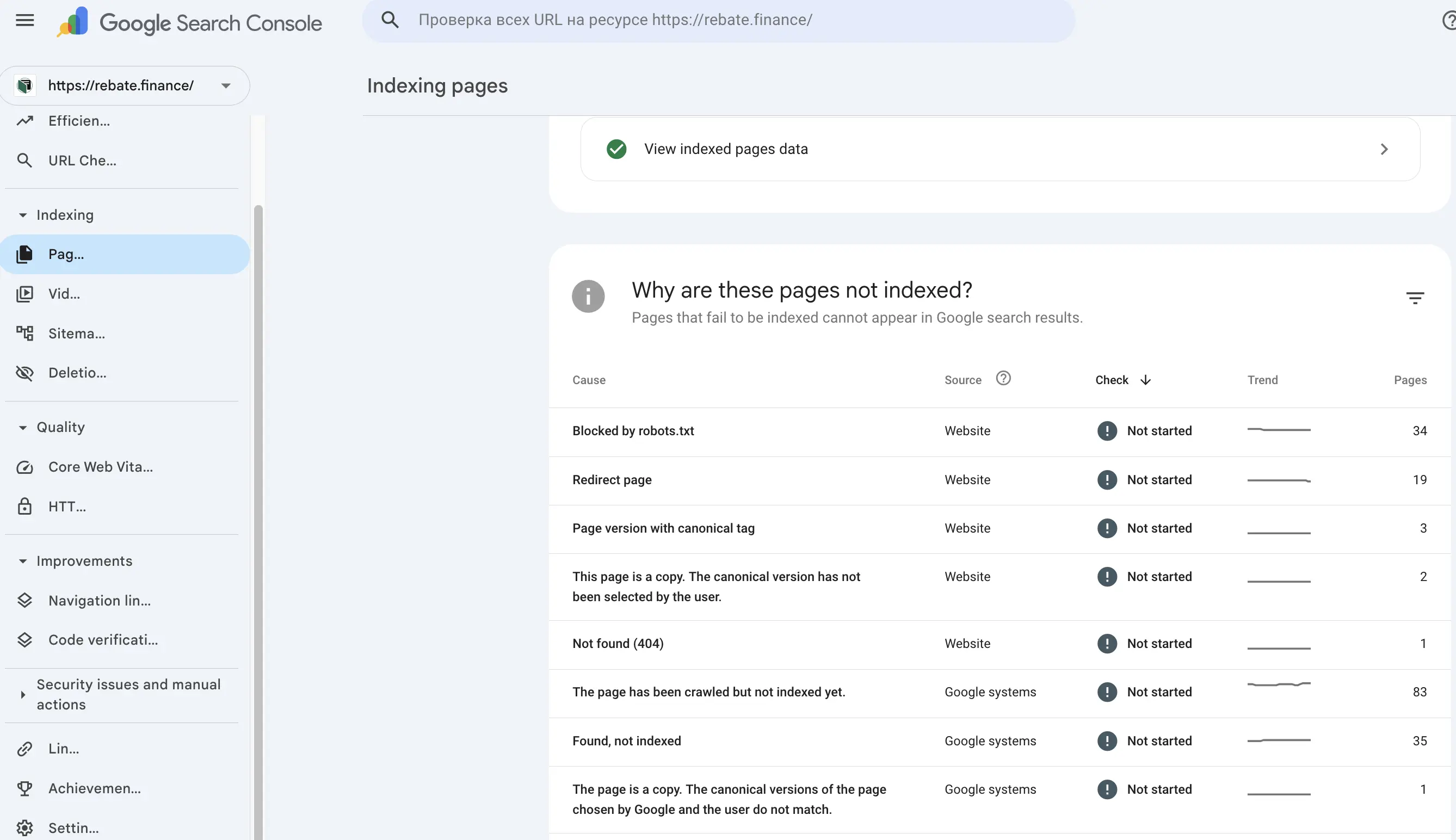
Situations like this are especially risky after changes to site architecture, section updates, page removals, or content migration. From the outside, the website may still look fully functional and consistent, but internally a layer of old URLs continues to exist, creating 404 errors, consuming crawl resources, and weakening SEO efficiency.
3. External links pointing to non-existent pages
For this, tools like Ahrefs or Semrush are useful, since they provide broken backlinks reports. Every external link pointing to a 404 page is effectively a lost SEO asset.
In practice, this happens much more often than many site owners expect. For example, when working with foreck.info, we also found a problem with external links pointing to outdated or unavailable URLs. This is especially sensitive for sites where some articles, sections, or addresses have already changed, while external sources still keep linking to the old pages.
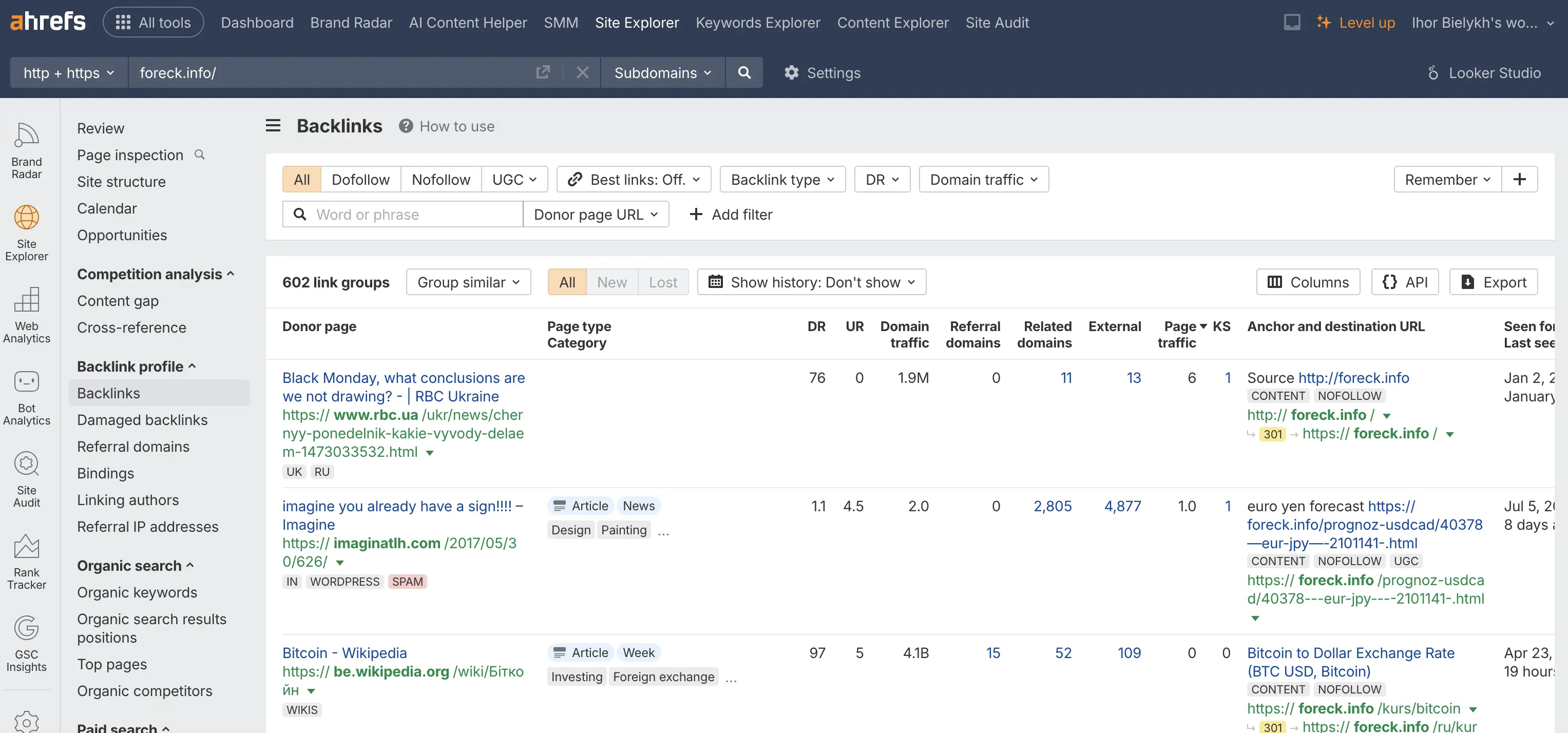
In this situation, the site formally retains its backlink environment, but in reality it does not receive the full SEO benefit from it. The external link exists, the donor passes a signal, but if the destination page no longer exists and returns 404, that authority does not strengthen the site’s live sections and does not contribute to visibility growth.
This is especially important for projects with a large amount of content, archives, analytical publications, and news pages. Over time, such sites accumulate a substantial backlink profile, and without regular checks of broken backlinks, part of that link capital starts to disappear simply because old URLs are no longer being maintained correctly.
What to do with different types of errors
Below is the basic prioritization logic.
404 pages with external backlinks
This is the most critical type of issue. If a page has earned external links, it should not simply be left deleted.
The best solution is:
- set up a 301 redirect to the closest existing page in terms of topic and intent.
404 pages with no links and no traffic
If a page has no external links, gets no traffic, and is not needed by users, it can remain a 404.
But in that case, you should:
- remove it from the sitemap;
- remove all internal links pointing to it;
- make sure it is no longer part of site navigation.
302 redirects used for permanent moves
If a page has moved permanently, a 302 should be replaced with a 301. This is especially important for pages that have external backlinks.
Redirect chains
Any redirect chain should be reduced to one direct 301 redirect. At the same time, internal links should be updated so that they point directly to the final URL instead of an old address through an intermediate redirect.
Internal links pointing to redirected pages
Even if the page eventually opens, internal links should go directly to the final destination. This reduces unnecessary load, improves crawl efficiency, and strengthens the overall technical quality of the site.
How to set up 301 redirects
If the site runs on WordPress or, for example, Joomla, one of the most convenient options is to use the Redirection plugin.
It allows you to:
- add 301 redirects without manually editing code;
- track 404 errors;
- quickly identify new problematic URLs;
- manage redirects centrally.
For individual pages, that is usually enough.
But if you are dealing with a large-scale URL restructuring, section migration, or a large number of redirect rules, a more efficient solution is to configure redirects at the server level via .htaccess.
Example:
# Redirect one page
Redirect 301 /old-page/ https://yoursite.ru/new-page/
This approach is faster because the redirect is handled at the server level before PHP, WordPress, or Joomla even loads.
Why redirect and broken-link audits are essential
404 and redirect issues rarely look critical at first glance. A site may open normally, pages may still be accessible, and the owner may not even notice the problem. But from an SEO standpoint, these issues gradually devalue the backlink profile, reduce the effectiveness of external links, and weaken rankings.
That is why auditing redirects, 404 pages, and external links is an essential part of a полноценный technical SEO audit.
Need help? We can run a technical SEO audit
If a website has changed its URL structure, moved to a new domain, lost pages, or simply has not had a technical check in a long time, there is a strong chance that part of its link equity has already leaked away.
Our team provides technical SEO audits in which we:
- identify 404 pages and broken links;
- find redirect issues;
- check redirect chains;
- analyze lost external backlinks;
- prepare a concrete action plan with priorities.
If you want to get a complete list of your site’s technical issues and understand exactly where link equity is being lost, submit a request for a technical audit. We will show the weak points and offer specific solutions to fix search performance problems.